


 Keshav Kaushik
·
·
Keshav Kaushik
·
·
If you last bought a code signing certificate a few years ago, the process has changed. You no longer get a .pfx file to download and copy onto your build machine. Since 1 June 2023, the private key for every publicly trusted code signing certificate, OV and EV alike, must be created and kept in certified hardware.
Two more things changed since then. Microsoft stopped giving EV certificates an automatic pass through SmartScreen, and from 1 March 2026 a code signing certificate can last at most 460 days. Here is what each change means and how to choose the right setup.
What changed, in one table
| Date | Change | What it means for you |
|---|---|---|
| 1 June 2023 | The private key must be generated and stored in hardware certified to FIPS 140-2 Level 2, Common Criteria EAL 4+ or equivalent | No more downloadable .pfx. You sign with a USB token, a cloud signing service or your own HSM. |
| 2024 | Microsoft ended the instant SmartScreen reputation for EV certificates | New EV-signed files build reputation the same way OV-signed files do. |
| 1 March 2026 | Maximum validity cut from 39 months to 460 days (CA/B Forum Ballot CSC-31) | Multi-year plans are delivered as a series of certificates. Expect to reissue about every 15 months. |
The hardware rule comes from the CA/Browser Forum's Code Signing Baseline Requirements. It applies to new certificates, renewals and reissues (DigiCert's summary). Ballot CSC-31 was proposed by Microsoft and passed with seven CAs in favour, including Sectigo, DigiCert and eMudhra, and none against.
Three ways to hold your signing key
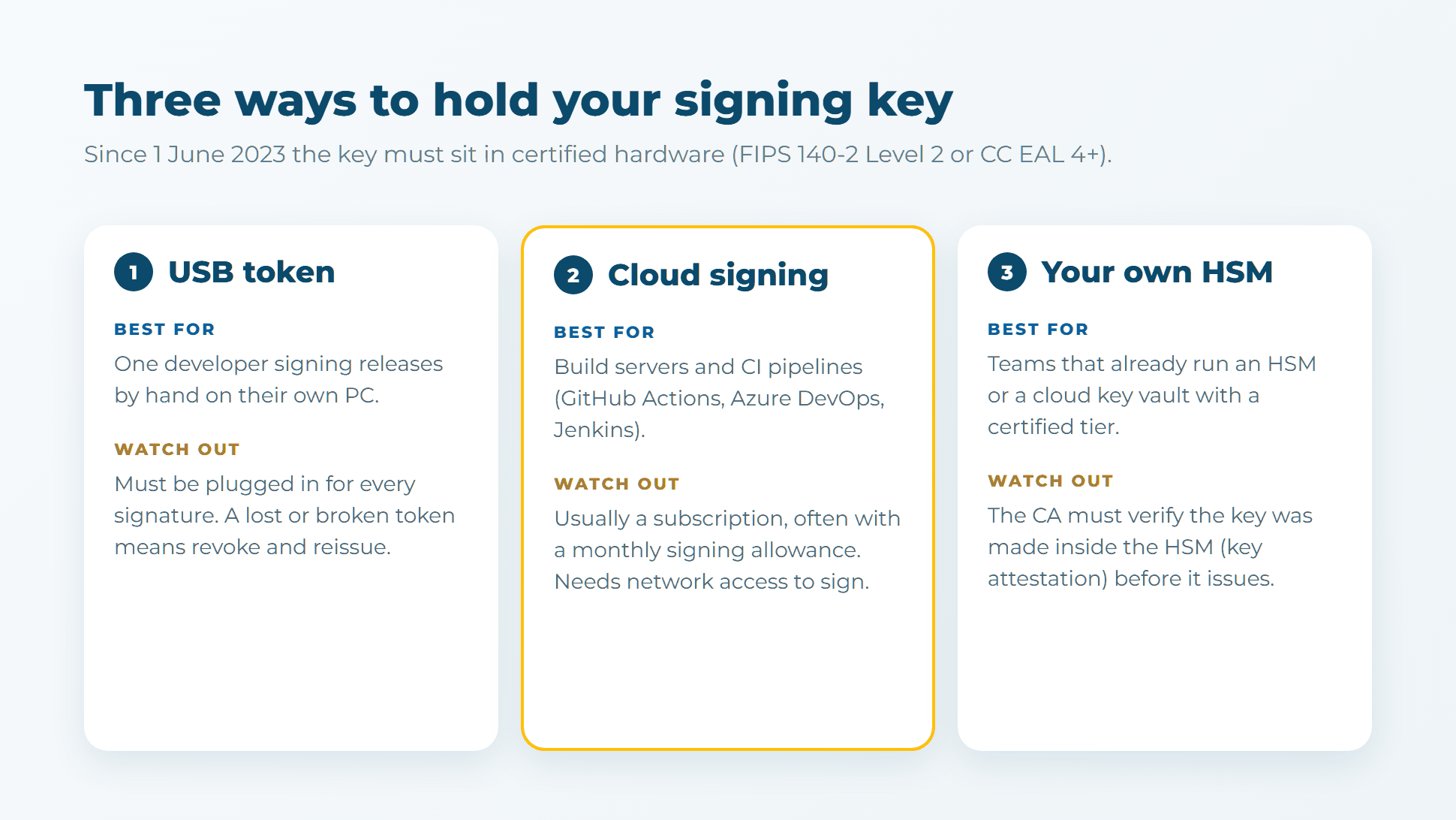
1. USB token
The certificate authority ships a hardware token, such as a SafeNet eToken, with your key created inside it. You plug it into the PC that signs, enter its PIN, and run signtool as before. It is the simplest option for one developer releasing a few builds a month.
The catch: the token must be physically present for every signature. That does not work on hosted CI runners, and a lost or broken token cannot be recovered. It means revoking the certificate and reissuing it onto a new token.
2. Cloud signing
The key lives in the CA's cloud HSM and you sign over the network, so your build server never holds the key. This is the best fit for GitHub Actions, Azure DevOps or Jenkins pipelines. These services are usually sold as a subscription, often with a monthly allowance of signatures, so check the allowance against your release rate.
3. Your own HSM or key vault
If you already run a network HSM, or a cloud key vault with a certified hardware tier, the CA can issue onto it. The CA must first see proof that the key was generated inside the HSM (key attestation). This suits larger teams; for most companies a token or cloud signing is cheaper.
Is EV still worth it?
For most software, no longer for SmartScreen. Microsoft's own guidance now says it plainly: "EV certificates no longer bypass SmartScreen... Paying a premium for EV solely to avoid SmartScreen warnings is no longer justified" (Microsoft Learn).
Today SmartScreen looks at two things: the reputation of the signing identity and the reputation of each file. Every new build starts unknown, and warnings fade as clean downloads add up. Signing every release with the same certificate helps reputation carry over from one version to the next.
| You need | Choose |
|---|---|
| To sign installers, EXE/DLL/MSI files or PowerShell scripts for customers | OV code signing, the standard choice |
| To register for Microsoft's Windows Hardware Dev Center and submit kernel-mode drivers | EV code signing, which Microsoft requires for that account (GlobalSign) |
| Stricter identity checks that a customer's procurement team asks for | EV |
| Only to remove the SmartScreen warning on day one | Neither certificate does that any more. Plan for reputation to build, or publish through the Microsoft Store. |
Microsoft also runs its own service, Artifact Signing (formerly Trusted Signing), starting at $9.99 a month. It is a good fit for Windows-only teams in the countries it covers. A certificate from a public CA still makes sense if you also sign Java, Office macros or drivers, or if you need a certificate in your company's legal name for customers' allow-lists.
Five habits that keep signed software trusted
- Always add a timestamp. Sign with
signtool sign /fd sha256 /tr <timestamp URL> /td sha256. A timestamped signature stays valid after the certificate expires. Without one, every file you shipped shows as invalid on the day the certificate runs out. - Plan reissues every 15 months. At 460 days, a three-year plan means about three certificates. Put the reissue date in your calendar, and keep the same organisation details so the publisher name stays identical.
- Keep one signing identity. Switching to a different company name or CA resets the publisher reputation SmartScreen has built up.
- Never modify a file after signing. Even a resource edit breaks the signature. Sign as the last build step.
- Guard the token or the cloud login. Use a separate signing account, turn on two-factor authentication, and log who signs what. A stolen signing identity is used to sign malware, and the certificate gets revoked.
The bottom line
Buy for how you build, not for the SmartScreen myth. A solo developer signing by hand does well with an OV certificate on a USB token. A team with a CI pipeline should sign in the cloud. Choose EV when you ship kernel-mode drivers or a customer asks for it.
Ready to order? Compare code signing certificates. Reissues are included for the whole term, and if you are unsure which key storage fits your build setup, ask our engineers before you buy.


Discussion